
Most wasted electricity is not dramatic. It is a television that never fully turns off, a printer that idles all night, a refrigerator in the garage that nobody opens, a building that runs at full tilt after the last person leaves. To stop wasting electricity, you measure what your property draws when nobody is using it, switch off or schedule what does not need to run, and then protect and optimize the power that remains. We build the Electric Saver 1200 for that last step: it is designed to cut energy costs by up to 25%, protect appliances from surges and help them last longer.
This guide walks through the whole routine in order, with the numbers behind each step.
TL;DR
- Idle load, the power your property draws while asleep or empty, can reach one-third of a home’s total electricity use. Measure it first.
- A single device on standby costs little, but dozens add up. Power strips, timers and unplugging rarely used gear are the cheapest fixes.
- In offices, the biggest wins come from computer power management, sleep settings and schedules, not from replacing equipment.
- After habits and scheduling, a whole-property device like the Electric Saver 1200 optimizes the power you still use and adds surge protection.
Table of Contents
- Where the waste actually hides
- Step 1: Measure your idle load
- Step 2: Stop standby power waste
- Step 3: Cut the always-on loads in an office or shop
- Step 4: Fix the big users, not just the small ones
- Step 5: Optimize and protect what is left
- What a worked example looks like
- Appliance life: the other half of saving electricity
- Where the Electric Saver 1200 fits
- Our perspective
- Ready to cut the waste for good?
- FAQ
- Sources
Where the waste actually hides
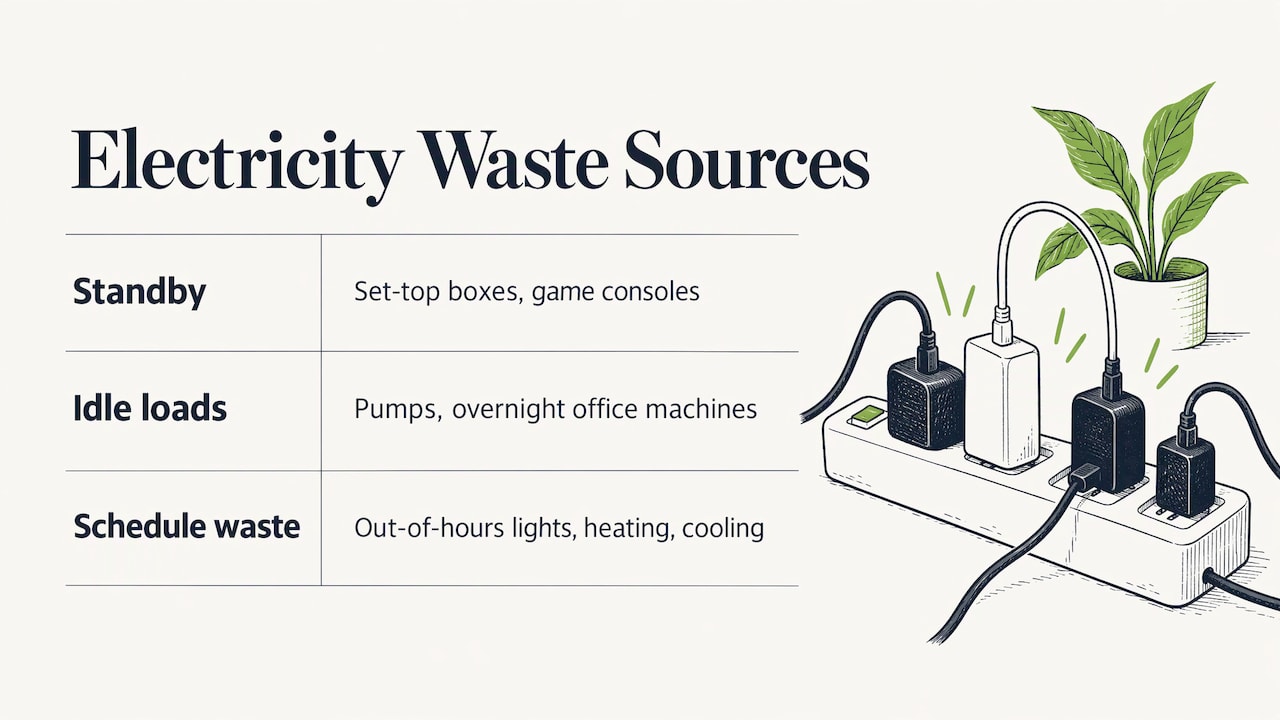
Before changing anything, it helps to know what kind of waste you are chasing. There are three.
Standby waste. Electronics that look off but are still drawing power to stay ready: set-top boxes, game consoles, chargers, smart speakers.
Idle and continuous loads. Equipment that runs when nobody needs it: hot-water recirculation pumps, a second refrigerator, office machines left on overnight.
Schedule waste. Lights, heating, cooling and equipment running outside the hours people are present. The UK government’s business efficiency campaign states that nearly half of business electricity use happens outside standard operating hours, and ENERGY STAR calls leaving equipment and lights on when they could be off the number one way to waste energy.
The Natural Resources Defense Council (NRDC), a US environmental nonprofit, groups home idle load the same way: electronics in standby (the fastest-growing category), continuous infrastructure loads such as recirculation pumps, and refrigeration equipment. Its guide says that idle load can represent as much as one-third of a household’s total electricity consumption.
Step 1: Measure your idle load
Guessing leads to unplugging the wrong things. A two-minute measurement tells you whether you have a real problem.
- Put the property to sleep the way it normally is at night or when the building is closed: lights off, computers asleep, everyone out of the way.
- Read the kilowatt figure on your digital electric meter.
- Multiply by 1,000. That gives your idle load in watts.
This is the method in NRDC’s idle load guide. A typical reading tells you where you stand: if the number is several hundred watts for an ordinary home, something is running that should not be. Check again after each fix to see the drop.
For a single device, a plug-in watt meter shows what it draws in standby. Lawrence Berkeley National Laboratory’s standby power program recommends exactly this when hunting for standby loads.
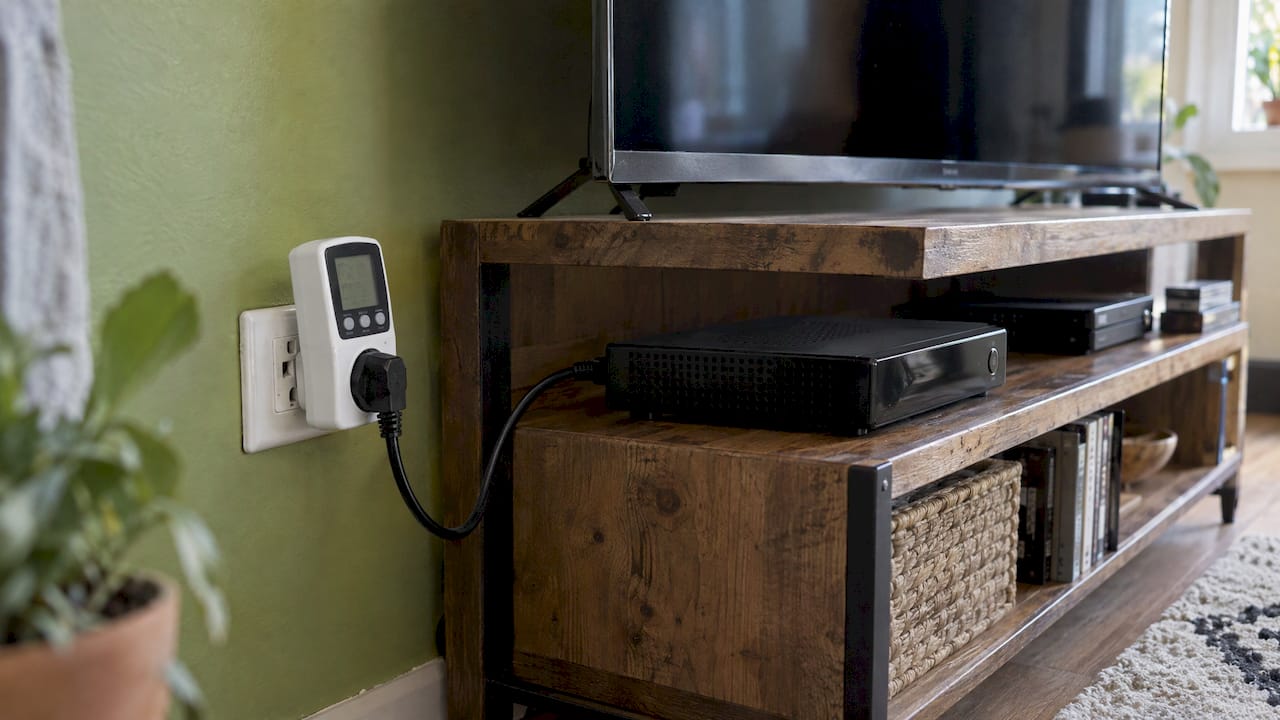
Where does this go wrong? People measure with the dishwasher mid-cycle, the refrigerator compressor happening to be running, or a water heater recovering. Take two or three readings and use the lowest steady one.
Step 2: Stop standby power waste
The arithmetic is simple. Lawrence Berkeley National Laboratory explains that a device drawing 1 watt around the clock uses about 9 kWh a year, roughly $1.20 at 13 cents per kWh. A 5-watt standby device costs about $6 a year. No single charger will change your bill. The point is the sum: the same source notes that a home can have 40 or more products drawing standby power.
A Canadian study by Natural Resources Canada and BC Hydro, which tested more than 850 products, found standby power typically ranges from 0.5 to 10 watts per device and cited expert estimates that 4% to 10% of residential electricity in OECD countries goes to standby. Televisions varied the most, from 0.01 to 47.8 watts.
What to do about it, in order of effort:
- Unplug what you rarely use. A guest-room TV and DVR, a spare refrigerator, a hardwired furnace in summer, as NRDC suggests.
- Group clusters on a switchable power strip. TV, console and streaming box on one strip; computer, monitor, printer and speakers on another. Advanced strips switch accessories off automatically when the main device sleeps.
- Put single-purpose heaters and pumps on timers. Hot-water recirculation pumps, instant coffeemakers and towel heaters do not need to run at 3 a.m.
- Turn off TV quick-start modes. NRDC notes that in some models this feature can draw up to 37 watts around the clock.
- Buy low-standby products. ENERGY STAR labeled products are the practical guide when replacing electronics.
Lawrence Berkeley’s researchers report limited evidence that an informed, aggressive approach can cut standby use by about 20%. That is a useful result for no cost, and it is also a ceiling on what habits alone deliver for this category.
Step 3: Cut the always-on loads in an office or shop
For businesses, the equipment list is different but the logic is the same. A Minnesota field study by Seventhwave, the Center for Energy and Environment and LHB measured what actually works in offices. The published results:
| Strategy | Measured saving |
|---|---|
| Computer power management | 106 kWh per workstation on average (29.1% of workstation energy) |
| Automatic power shutoff with occupancy sensors | 67 kWh (21.7%) |
| Plug-load timers on beverage equipment | About 100 kWh per device |
| Plug-load timers on printers and medium multifunction devices | About 50 kWh per device |
| Newer single-serving coffeemaker vs. pot coffeemaker | 470 kWh per year less |
The study also found that adding a behavior campaign on top of automatic shutoff added about 50 kWh of savings at the two sites where it was tried. Automation does the heavy lifting, and reminders help at the margin.
The U.S. Department of Energy’s Office Energy Checklist says the same in practical terms: unplug chargers, fans, coffeemakers and desktop printers when idle, enable low-standby settings on computers and copiers, turn off computers and monitors at the end of the day, use LED lighting with dimmers or occupancy sensors, and install meters to track use. ENERGY STAR adds that consolidating stand-alone office machines to one networked multifunction device per 10 or more users can cut electricity, hardware, consumables and maintenance costs by 30 to 40 percent.
If you manage a building with an energy management system, check how it is programmed. ENERGY STAR reports that most facilities under-use these systems, which can run night setback, optimal start and stop, and lighting sweeps, and that the payback for better scheduling is almost immediate. Our guide to commercial energy efficiency and the breakdown of what business electricity costs show how to turn that into a building-level plan.
Step 4: Fix the big users, not just the small ones
Standby is the easy part to see. Heating, cooling, water heating, laundry and refrigeration usually make up most of a bill. The Australian government’s YourHome guide, for example, puts heating and cooling at around 40% of household energy and appliances at around 25%, with clothes dryers up to 10% for heavy users and pool pumps up to 18% in homes that have a pool. Those shares are Australian, and US homes differ by climate and fuel, but the ranking of big loads is a useful starting point. Your own utility bill, or a look at which appliances affect your power bill most, will show your home’s pattern.
Practical moves for the big users:
- Heating and cooling: keep filters clean, seal leaks and consider what the building envelope is doing. Windows are a large part of that, and this energy efficient windows guide explains how glazing and frame choices affect heat loss.
- Dryers: clean the lint trap every load and run full loads.
- Refrigerators and freezers: remove the spare unit you barely use, and keep coils and door seals clean.
- Lighting: LEDs with motion sensors in rooms that empty often.
Why is the bill suddenly higher? Usually a changed load: a new appliance, a failing compressor or a season shift. Our guides to why an electric bill is high and how to find the cause and cut the cost walk through the diagnosis.
Step 5: Optimize and protect what is left
Once you have switched off what you can, the rest of your power is what the property genuinely needs. Two things still matter at that point: how efficiently the equipment uses that power, and whether it survives it.
Motors in air conditioners, refrigerators, pumps and compressors draw more current than the useful work they do, because they also need reactive power to run. Reactive power is the supporting actor in the play: it does not show up on the stage as useful work, but the performance cannot happen without it. Power factor is the ratio of useful power to total apparent power, and when it is low, wiring and equipment carry extra current. Power factor correction supplies that reactive power locally. Our explainers on what power factor is and over-correction cover the math and the pitfalls.
The Electric Saver 1200 is built on this principle. It recycles energy and feeds it back into the home or business, and we design it to save up to 25% on energy costs. It also gives whole-property surge protection, which matters for appliance life, since repeated spikes wear down electronics and motors. Our pages on whole-house surge protection and how a surge protector works explain the protection side.
For most people, this is where the first four steps stop paying and the fifth begins: habits trim what you draw, and a whole-property device improves how the rest is used.
What a worked example looks like
Take a home with ten always-on devices averaging 5 watts each. Using Lawrence Berkeley’s math, each costs about $6 a year at 13 cents per kWh, so the set costs about $60. Put six of them on two power strips and unplug one rarely used unit: you have removed most of that $60 in an afternoon.
Now take a small office with eight workstations. Computer power management at the Minnesota study’s average of 106 kWh per station is 848 kWh a year across the office. Add timers on a coffee machine and a printer at roughly 100 kWh and 50 kWh each, and the office recovers about 1,000 kWh a year before touching any equipment. The result depends on your rates and hardware, so treat these as arithmetic on published averages, not a quote.
Appliance life: the other half of saving electricity
Wasting electricity and wearing out appliances often come from the same causes: equipment running when it does not need to, motors straining on poor power, and surges hitting electronics. Habits help: full dishwasher loads, a clean lint trap, regular defrosting and coil cleaning. Surge protection at the panel covers every circuit, including the ones you cannot plug a strip into, such as the air conditioner, furnace, well pump and refrigerator. Our guide to how many joules of surge protection you need explains how ratings translate to real protection.
Where the Electric Saver 1200 fits
If you have worked through the steps above and want one device that treats the whole property, the Electric Saver 1200 is the option we make. Here is what the CLIENT-side facts look like in practice:
- UL and CuL safety listed, with the company citing NASA verification.
- Made in the USA, with a 20-year warranty.
- Compatible with any household or business voltage up to 480v, including properties with solar panels.
- Models for single-phase and three-phase systems, residential and commercial.
- Designed for easy installation. See our installation page.
Homeowners can see the Residential Electric Saver 1200. Businesses can look at the Power Factor Correction Products, listed at $1,499.95 to $1,999.95 one-off. Electricians and resellers can find wholesale and bulk pricing for dealers.
Our perspective
Wasting less starts with attention. Measure the idle load, switch off what nobody needs, schedule what runs on a clock. We would tell any homeowner or facility manager to do those things first, because they are cheap and they work.
What remains is the power your property really uses, and that is where we focus. Motors, compressors and electronics run better on clean, well-corrected power, and they last longer when surges are stopped at the panel. The Electric Saver 1200 does both jobs in one unit, UL and CuL listed, made in the USA and backed by a 20-year warranty.
A good plan combines the two: smarter habits on the small loads, and a whole-property device on the big picture. That is how a bill goes down and stays down.
Jonica
Ready to cut the waste for good?
Habits take care of the standby load. For the rest of your bill and the lifespan of your equipment, we make the Electric Saver 1200 for homes and businesses, with models for single-phase and three-phase systems and fast shipping on every order. Pick the residential unit or a commercial power factor correction model and put the whole property to work for you.

Start at our main page or go straight to the residential Electric Saver 1200.
FAQ
How do I stop standby power waste?
Measure first with a watt meter, then unplug rarely used devices, put TV and computer clusters on switchable power strips and put pumps and small heaters on timers. Disable quick-start modes on TVs. Lawrence Berkeley National Laboratory reports that an informed, aggressive approach can reduce standby use by about 20%.
What uses the most electricity in a home?
Heating, cooling and water heating usually lead, followed by appliances such as dryers and refrigerators. Idle load matters too: NRDC says it can reach one-third of household use. Your own meter reading at night shows how large yours is. See our guide to ways to save electricity at home for a room-by-room list.
How can a business stop wasting electricity?
Start with schedules and automation: power management on computers, sleep settings on printers, occupancy sensors and timers. The Minnesota study measured 29.1% savings on workstation energy from computer power management alone. Then look at power factor and building-wide efficiency, covered in our commercial energy efficiency guide.
Can the Electric Saver 1200 work with solar panels?
Yes. Our devices are compatible with any household or business voltage up to 480v, including properties with solar panels. Single-phase and three-phase models are available, so you can match the unit to your electrical service.
Sources
- NRDC: Home Idle Load Self-Diagnosis and Action Guide
- Lawrence Berkeley National Laboratory: Standby Power FAQ
- Canadian Standby Power Study of Consumer Electronics
- Impacts of Office Plug Load Reduction Strategies (Minnesota)
- U.S. Department of Energy: Office Energy Checklist
- ENERGY STAR: Checklists of Energy-Saving Measures
- ENERGY STAR: Operation and Maintenance Best Practices
- UK Energy Efficiency for Businesses campaign
- YourHome: Appliances and technology (Australia)